While debugging a recent bug, I ran into a peculiar issue: android.database.sqlite.SQLiteFullException: database or disk is full (code 13). After extensive research without a definitive root cause, I am sharing my findings here in the hope that others with similar experiences can help shed light on this.
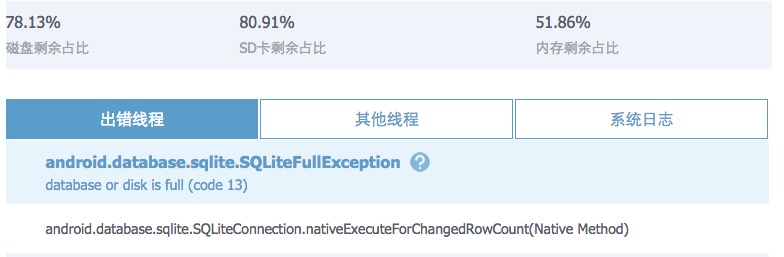
Initially, I suspected the disk was full, but the screenshot above suggested otherwise. Next, I wondered if SQLite had a size limit. A classic Stack Overflow discussion covers this: maximum-number-of-rows-in-a-sqlite-table
In July 2011 the sqlite3 limits page was updated to define the practical limits…The theoretical maximum number of rows in a table is 2^64 (about 1.8e+19). This limit is unreachable since the maximum database size of 14 terabytes will be reached first. A 14 terabytes database can hold no more than approximately 1e+13 rows…So with a max database size of 14 terabytes you’d be lucky to get ~1 Trillion rows since if you actually had a useful table with data in it the number of rows would be constrained by the size of the data.
My data volume was nowhere near those numbers. I then checked if it was a platform-specific issue by looking at the Comparison of relational database management systems on Wikipedia, but that was not the answer either. So I systematically went through the official documentation at Limits In SQLite. Here is a summary of the key limits.
Key SQLite Limits
String / BLOB Length
Maximum of 2^31 - 1 bytes (2,147,483,647 bytes, approximately 2 GB).
Number of Columns
Default maximum is 2000, adjustable to 32767 at compile time.
SQL Statement Length
Default limit is 1,000,000 bytes, configurable up to 1,073,741,824 bytes (1 GB).
Tables in a JOIN
Supports up to 64 tables in a single join query.
Expression Tree Depth
Default limit is 1000; set to 0 for no enforced limit.
Function Arguments
Default maximum is 100 parameters.
Compound SELECT Terms
Default is 500.
LIKE / GLOB Pattern Length
Default is 50,000 bytes. SQLite notes that the time complexity is O(N^2), where N is the total character count.
Host Parameters in a Single SQL Statement
Default maximum is 999.
Trigger Recursion Depth
Supported since v3.6.18; default is 1000 as of v3.7.0.
Attached Databases
Default maximum is 10, with an absolute maximum of 125.
Pages in a Database File
Typically set to 1,073,741,823, with a maximum of 2,147,483,646. Combined with the maximum page size of 65,536 bytes, this yields a maximum database size of about 140 TB. Note: Starting from SQLite 3.45.0, the page count limit increased to 2^32 - 2, corresponding to a maximum of approximately 281 TB.
Rows in a Table
Theoretical maximum is 2^64 (approximately 1.8e+19), but the file size limit is reached first.
Maximum Database Size
Every database consists of one or more “pages.” Page sizes are powers of two between 512 and 65,536 bytes. The maximum database file is 2,147,483,646 pages. At the maximum page size of 65,536 bytes, this translates to approximately 140 TB (128 TiB).
Investigation Directions
Given that SQLite’s own limits far exceed any realistic scenario for my case, the focus should shift elsewhere. Two directions worth exploring.
Database Size and VACUUM
If you delete a lot of data but the database file does not shrink — this is not a bug. SQLite adds the freed space to an internal “free-list” and reuses it on the next insert, but it does not return space to the operating system.
To reclaim space, run the VACUUM command:
| |
VACUUM rebuilds the database from scratch, producing a minimal file with an empty free-list. However, it requires up to 2x the original file size in temporary disk space and can be slow.
As an alternative, enable auto-vacuum mode:
| |
The trade-off: auto-vacuum reclaims free pages automatically but can cause more fragmentation and does not compact partially filled pages the way VACUUM does.
Database Maximum Size (Android Platform)
If the database comes from a third-party library or framework layer, it may have an explicit size limit. Check it with:
| |
If needed, call setMaximumSize() to relax the limit, or add compatibility handling.
Related discussion: Bugly SQLiteFullException (link may no longer be valid)
If you have had similar experiences or know of other possible causes, please share.
References
- Limits In SQLite (sqlite.org)
- VACUUM Command (sqlite.org)
- Maximum number of rows in a SQLite table (Stack Overflow)
- Comparison of relational database management systems (Wikipedia)
- SQLiteFullException (Android Developers)
- Performance characteristics of SQLite with very large database files (Stack Overflow)