The Palette library, part of Android Support Library (now migrated to AndroidX palette), extracts representative colors from a Bitmap. In Material Design, deriving UI colors from imagery is a common pattern, and Palette makes this straightforward.
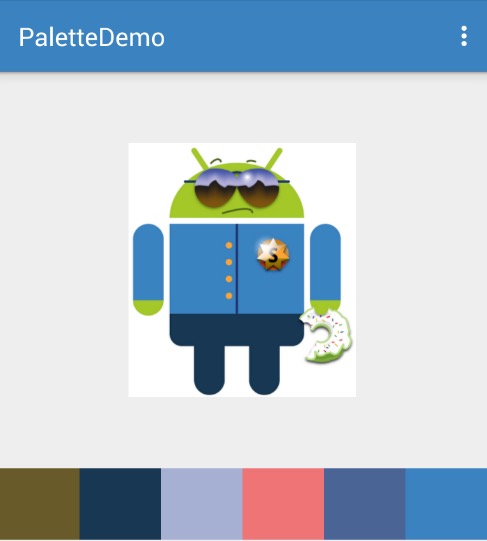
palette01

Supported Color Profiles

Palette provides six color profiles covering vibrant to muted tones:

ProfileDescription
VibrantBright, saturated
Vibrant DarkDark variant of vibrant
Vibrant LightLight variant of vibrant
MutedSubdued, desaturated
Muted DarkDark variant of muted
Muted LightLight variant of muted

Each profile corresponds to a Palette.Swatch object that provides RGB/HSL values, population count, and recommended text colors for overlaying on the swatch.

Basic Usage

Palette supports both synchronous and asynchronous generation:

1
2
3
4
5
6
7
8
9
// Synchronous generation (run on background thread)
public static Palette generate (Bitmap bitmap);
public static Palette generate (Bitmap bitmap, int numColors);

// Asynchronous generation
public static AsyncTask<Bitmap, Void, Palette> generateAsync (
    Bitmap bitmap, Palette.PaletteAsyncListener listener);
public static AsyncTask<Bitmap, Void, Palette> generateAsync (
    Bitmap bitmap, int numColors, Palette.PaletteAsyncListener listener);

The synchronous generate method completes in tens of milliseconds. The async variant runs on a background thread via AsyncTask and delivers results through a callback.

About the numColors Parameter

numColors controls the number of colors extracted:

For landscapes, 12-16 colors suffice. For images dominated by faces, increase to 24-32 for better detail.

Smaller values yield faster generation; larger values produce finer color granularity. Default is 16.

Example

The following example extracts colors from a Bitmap and applies them to the ActionBar and a set of views:

 1
 2
 3
 4
 5
 6
 7
 8
 9
10
11
12
13
14
15
16
17
18
19
20
21
22
23
24
25
26
27
28
29
30
31
32
33
34
35
36
37
38
39
40
Bitmap bitmap = BitmapFactory.decodeResource(
    getResources(), R.drawable.strictdroid);
Palette.generateAsync(bitmap, new PaletteAsyncListener() {

    @Override
    public void onGenerated(Palette palette) {
        getSupportActionBar().setBackgroundDrawable(
                new ColorDrawable(
                    palette.getVibrantSwatch().getRgb()));
        for (int i = 0; i < viewList.size(); i++) {
            View view = viewList.get(i);
            switch (i) {
                case 0:
                    view.setBackgroundColor(
                        palette.getDarkMutedColor(Color.BLACK));
                    break;
                case 1:
                    view.setBackgroundColor(
                        palette.getDarkVibrantColor(Color.BLACK));
                    break;
                case 2:
                    view.setBackgroundColor(
                        palette.getLightMutedColor(Color.BLACK));
                    break;
                case 3:
                    view.setBackgroundColor(
                        palette.getLightVibrantColor(Color.BLACK));
                    break;
                case 4:
                    view.setBackgroundColor(
                        palette.getMutedColor(Color.BLACK));
                    break;
                case 5:
                    view.setBackgroundColor(
                        palette.getVibrantColor(Color.BLACK));
                    break;
            }
        }
    }
});

Each getXxxColor() method accepts a default color parameter, used when the requested profile is not present in the image.

Migration to AndroidX

The original v7 Palette library has migrated to AndroidX:

1
implementation("androidx.palette:palette:1.0.0")

The API remains largely the same. The Builder pattern (Palette.from(bitmap).generate()) is recommended for new code, offering customization options like maximumColorCount(), addFilter(), and resizeBitmapArea().

References